The Google TV Streamer is a small device that you connect to your television. From then on you can stream programs on your television via your WiFi. You can then use your PC, laptop, iPad or even your smartphone as a remote control.
How to install the Google TV Streamer?
Connecting a Google TV Streamer is simple, just plug & play. You connect it via the HDMI port of your television. The power is supplied via USB (if your TV has such a port), or via a regular power adapter.
Then you download the Google Home app on your tablet or smartphone. You add your Google TV Streamer via the app and follow the instructions. Once installed, you can stream from any app that supports casting..
Compatible apps show this icon:
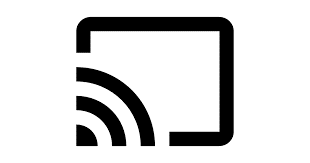
You click on it and select your Google TV Streamer to start streaming to your television. Make sure your television is tuned to the correct HDMI channel.
A.o. these apps are compatible with the Google TV Streamer:
| Netflix | Streamz | Disney+ |
| VrtMAX | VTM GO | |
| Google Play Movies | Amazon Prime | Apple TV |
And did you know that you can also stream music? With, for example, Spotify, Apple Music or Youtube Music you stream the sound to your speakers.
The target price of a Google TV Streamer is €119. Buy it here from Google itself and check out the detailed installation instructions.
With a VDSL or Fiber subscription you can surf and stream with the whole family, starting from €21,95 / month!